Last reviewed
Soccer team snack and volunteer schedule: one sheet for snacks, scorekeeper and drivers
A soccer snack schedule is a list of every game with a family's name next to it. The version that lasts all season puts the game's other jobs on the same row: who keeps score, who drives to away games, and anything else your team needs on a Saturday. Fill it in before the first game, give every family a turn, and agree one rule for swaps. Then "who's doing what this week?" has one answer.
Below is what to put on the sheet, a worked season for 14 families, a printable sheet, and how the same thing works on each game in PlayHub.
The jobs a soccer game needs
| Job | How many | Notes |
|---|---|---|
| Snacks | 1 family, or 2 for a big squad | Agree halftime, after the game, or both, and any foods the team avoids, before the first game |
| Scorekeeper | 1 person | Somebody other than the coach. Records goals, and posts the score for families who can't come |
| Drivers | As many seats as you need | Away games only, and only if your team carpools |
| Anything your league asks of the team | Whatever it asks | Some leagues ask each team for a volunteer on game day. Check your league's rules, not this list |
Keep it to the jobs your team actually does. A sheet with seven columns and three of them empty every week teaches families to ignore it.
A worked season: 14 families, 10 games
A team of 14 plays 10 games: 6 at home and 4 away. The manager asks before the first game who can keep score, and five parents say yes.
- Snacks: one family per game is 10 turns. Ten families take one game each. The four left over are the first to ask when a snack family needs a swap.
- Scorekeeper: five volunteers, two games each, covers all 10.
- Drivers: three seats for each of the 4 away games is 12 places, filled by the families nearest the field that week, not assigned for the season.
The first five rows look like this. Families are written by shirt number, so the sheet can be posted without a child's name.
| # | Game | Snacks | Scorekeeper | Drivers |
|---|---|---|---|---|
| 1 | Sat 9:00, home vs Riverside FC | #7's family | #3's parent | |
| 2 | Sat 10:30, away at Northgate FC | #10's family | #3's parent | #5, #9, #12 |
| 3 | Sat 9:00, home vs Lakeview SC | #2's family | #11's parent | |
| 4 | Sat 11:00, home vs Harbor United | #14's family | #11's parent | |
| 5 | Sat 9:30, away at Eastside FC | #6's family | #1's parent | #4, #8, #13 |
Every team, field and family in this example is invented.
The swap rule
Write one rule at the top of the sheet: can't do your game, find a family to swap with and tell the manager. The manager changes the sheet once, instead of chasing a replacement on Friday night. A swap nobody told the manager about hasn't happened.
Keep it about the team
Write families as "#7's family", not a child's full name, if the sheet goes anywhere outside the team. Write allergies as "the team avoids nuts", never next to a child.
The printable sheet
The snack and volunteer schedule (PDF, US Letter, landscape) has one row per game for 12 games, columns for snacks, the scorekeeper, drivers and two jobs you name, a box for the team's snack notes, and a place to record swaps.
To build it in a spreadsheet instead, copy this header row:
| # | Date and kickoff | Opponent | Home / away, field | Snacks | Scorekeeper | Drivers | Other job |
|---|
Finding a scorekeeper for every game
If the scorekeeper's place is the one that stays empty on your team, three things help:
- Ask for two games, not the season. "Can you keep score on the 14th and the 28th?" is two dates a parent can check against their calendar. "Can you keep score this year?" is a season they have to promise.
- Show what it involves. On PlayHub's tracker a goal is + GOAL, the scorer, then the assist or No assist / not sure. Our first-time scorekeeping walkthrough shows every screen, and the futsal version adds the foul count.
- Say who it's for. The scorekeeper is also the person the grandparents at home are waiting on. Say so when you ask. See how to let family follow a game live.
Doing it in PlayHub
Every game on a PlayHub team's schedule has a Jobs section, with a Scorekeeper place on every game. Anyone on the team taps I'll keep score, or the manager taps Assign and picks somebody.
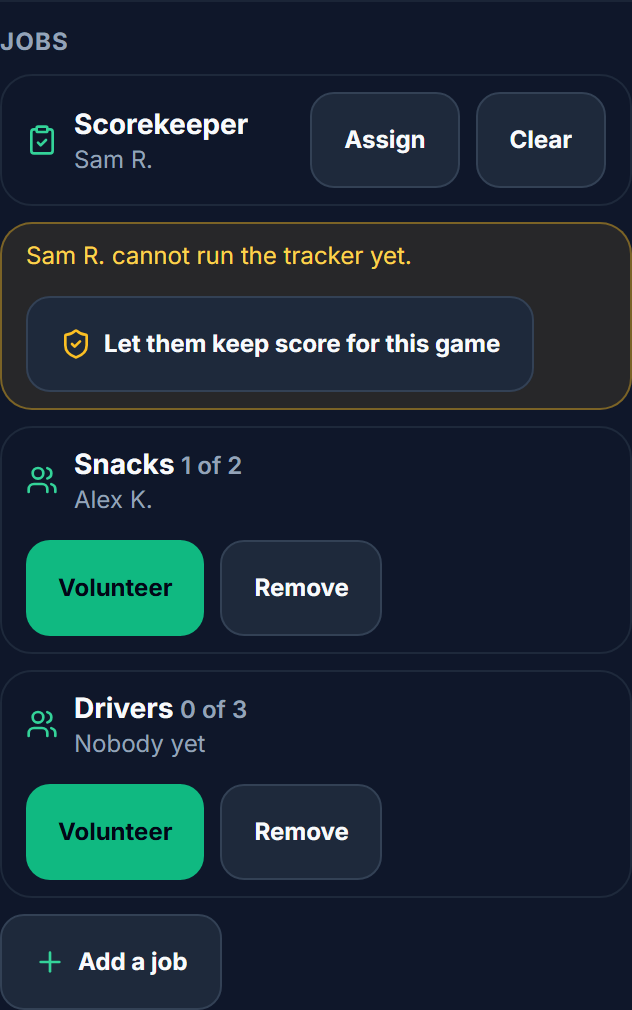
The manager's Add a job puts another job on that game, such as Snacks or Drivers, with 1 to 5 places. Families tap Volunteer to take a place and Withdraw to give it back. A game can have up to 10 jobs.
When the scorekeeper isn't somebody who can already run the tracker, the manager sees Let them keep score for this game:
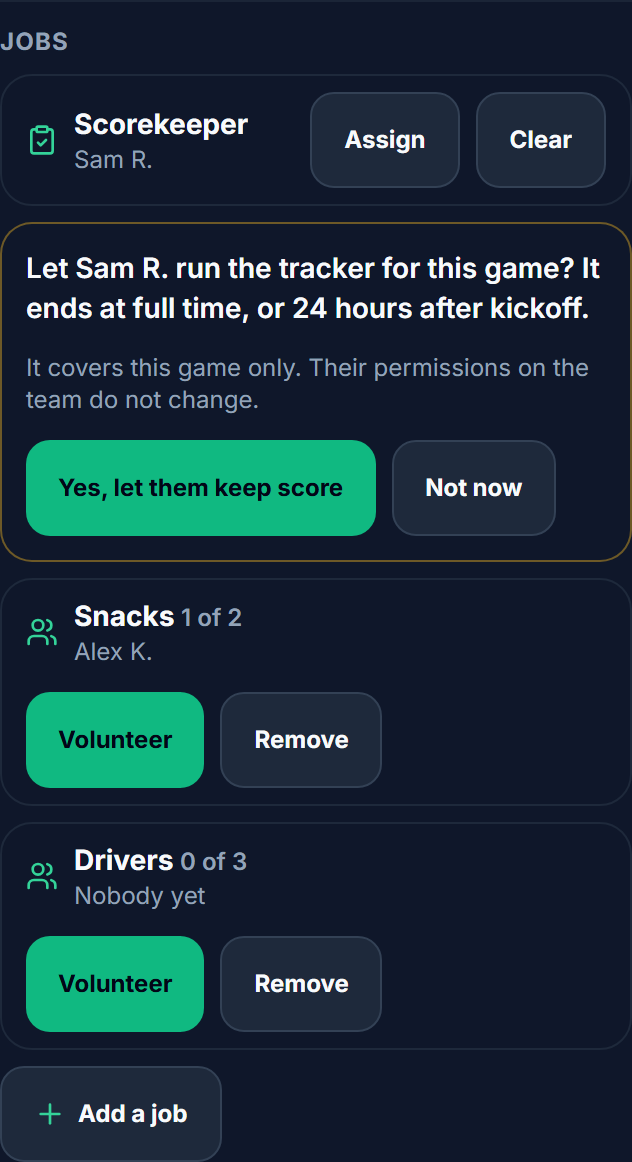
That lets a parent keep score for one game without being given the team. On match day the scorekeeper's game shows Keep score, one tap into the tracker.
What it doesn't do, so you can plan around it:
- Jobs are per game. There are no jobs on practices, and nothing fills a season's schedule for you: you add each job to each game.
- Nobody is reminded. Post the week's jobs in the team's messages, in the app.
- A job never changes who's playing. Volunteering has no effect on a family's Yes, No or Maybe, or on the match-day roster.
- Only the team sees it. Family invited only to watch see the games, not the jobs.
One payment covers the whole team. See how PlayHub works
FAQ
How do you make a snack schedule for a soccer team?
List every game with its date, kickoff and field, then put one family next to each game. Give every family a turn before anyone gets a second one, agree before the first game whether snacks are at halftime or after and which foods the team avoids, and write one swap rule at the top: find a family to swap with and tell the manager.
How many families should bring snacks to each game?
One family per game gives every family a turn when the season has about as many games as the roster has players. A large squad may want two. Decide before the first game and keep it the same all season, so nobody arrives with snacks for half the team.
What volunteer jobs does a youth soccer team need?
For each game: snacks, a scorekeeper, and drivers for away games if your team carpools. Some leagues also ask each team for a volunteer on game day, so check your league's rules. Put them all on one sheet, one row per game, so families see every job at once.
How do I find a parent to keep score at every game?
Ask each volunteer for two named games rather than the season, and show them what the job involves before they say yes. On a live tracker, recording a goal and its scorer is two taps.
Can a parent keep score in PlayHub without running the team?
Yes. When a parent is down as a game's scorekeeper, the manager can choose "Let them keep score for this game". They can run that game's tracker until full time, or for 24 hours after kickoff, and their permissions on the team don't change.
Sources
| Document | Edition / year | Link | Used for |
|---|---|---|---|
| PlayHub help, Run a match | accessed 2026-11-08 | https://www.playhub-os.com/help/team-matchday | The Jobs section, the Scorekeeper place, Let them keep score for this game, Add a job |
Leagues, teams and fields named in the worked example are invented.