Last reviewed
How to know who's coming: tracking availability for a youth soccer team
To know who's coming to a youth soccer game, ask once per game in one place, give families three answers (yes, no or maybe) and a deadline, then follow up only with the families who haven't answered. By the night before the deadline you have a count of yes, no, maybe and no answer, and the coach knows whether there are enough players and how many subs there will be.
The same routine works for practices. This guide covers when to ask, how to read the count, a worked example of a short Saturday, and a sheet you can copy if your team does it on paper.
Why a single question beats a group chat thread
"Who can make Saturday?" in a busy chat gets a dozen thumbs-up, three "we'll try", and silence from the families you most need to hear from. Nobody can tell at a glance which players those answers are for.
Four things make availability work, whatever you use to ask:
- One question per event. Saturday's game and Tuesday's practice are separate questions, because the answers differ.
- One answer per player, given by that player's own parent. Not one "we're in" from a parent with two children on the team.
- Three answers, and a fourth state. Yes, no and maybe, plus "no answer yet". Keep no answer separate from maybe: a maybe has thought about it, a no answer has not seen the question.
- A deadline. "Answer by Thursday at 8pm" turns a question into a list you can close.
When to ask
| Event | Ask | Deadline | Then |
|---|---|---|---|
| Saturday game | When the week's schedule is confirmed, usually Sunday or Monday | Thursday evening | Thursday night: follow up with every family that hasn't answered. Friday: send the count to the coach |
| Weekday practice | With the game question, for the whole week | The day before | Tell the coach if numbers are low enough to change the session |
| Tournament weekend | As soon as the dates are known, often weeks ahead | Before the team has to register its roster with the tournament | Ask again the week before. Plans change |
Ask earlier than feels necessary for anything that needs a number in advance, such as tournament registration or carpools to an away game.
How to read the count
Yes is the number you can plan on. Maybe and no answer are the numbers you work on.
- Yes is who the coach can pick from. Plan the lineup from this number only.
- No needs no follow-up, though a short reason ("injured", "away") helps the coach.
- Maybe gets one message on the deadline night: "Can you confirm by tomorrow?"
- No answer gets a direct message to that family. It's usually a missed question, not a no.
Then compare Yes with the number your game needs. Under Law 3.1 of the IFAB Laws of the Game (theifab.com, read October 2026), which govern 11-a-side soccer, a match is played by two teams of up to eleven players, and "A match may not start or continue if either team has fewer than seven players." Youth leagues often play smaller formats at younger ages and set their own numbers, so check your league's rules for the format you play.
A worked example: a short Saturday
A team of 14 plays 11-a-side on Saturday at 9am. The manager asked on Sunday, with a Thursday 8pm deadline. At 8pm Thursday the count is:
| Answer | Players | Count |
|---|---|---|
| Yes | #1, #3, #4, #5, #7, #8, #10, #11, #14 | 9 |
| No | #6 (injured), #12 (away) | 2 |
| Maybe | #9 | 1 |
| No answer | #2, #13 | 2 |
| Roster | 14 |
What the manager does with it:
- Reads the gap. 9 yes is enough to play under Law 3.1 (seven is the minimum), but it is two short of a full eleven, with no subs.
- Follows up with three families, not fourteen. One message to #9's parent asking for a yes or no by Friday morning, and one each to the parents of #2 and #13.
- Tells the coach Thursday night, not Saturday at 8:45: "9 yes, 3 still open, 2 no."
- Updates the count Friday. #2 and #13 say yes, #9 says no. That's 11 yes, a full side and no subs. The coach plans for that, and decides whether to ask about a guest player under whatever your league's rules allow.
Without the count, the same team finds out at the field that it has nine.
Practices
Practice answers are worth collecting even though nothing is at stake on the scoresheet. A coach planning a session for 14 who gets 6 runs a different session.
An answer is a plan made beforehand. It isn't a record of who actually came. If your club needs attendance, take it at the field.
Keep the answers inside the team
Who's away on Saturday, and why, is information about a child's whereabouts and sometimes their health. Keep it within the team: share the count and the names with the coaching staff and the team's families, not on a public page or a club-wide channel. "No (injured)" is enough. The details belong in a private message to the coach.
A sheet you can copy
If your team does this on paper or in a shared sheet, one row per player and one column per event is all it takes. Use shirt numbers, and first names only if you need them.
| # | Player | Tue practice | Sat game | Note |
|---|---|---|---|---|
| 1 | ||||
| 2 | ||||
| 3 | ||||
| 4 | ||||
| 5 | ||||
| 6 | ||||
| 7 | ||||
| 8 |
Fill each cell with Y, N or M, or leave it blank for no answer. The blank cells on Thursday night are your follow-up list.
And a message to ask with:
Saturday's game is at 9:00 (arrive 8:30) at Field 3. Please answer yes, no or maybe for your player by Thursday 8pm, so the coach can plan the lineup. If you're not sure yet, maybe is fine, but please confirm by Friday morning.
Doing it with PlayHub
In PlayHub every game and practice on the team's schedule asks "Available?", with Yes, No or Maybe, in the app. Only that player's own parent or guardian can answer for them, and the parents and staff on the team can see the count, with a list of who hasn't answered yet. Nobody is reminded automatically, so you still post the question to the team in the app and follow up with the families who have not answered. See the help article on who can make it.
Setting the deadline in the app
The deadline from the routine above can be a team setting. In the team's Settings, under "What this team uses", switch on Ask families to answer by and choose the days before each event and the time. Three days before at 6:00 PM is Wednesday evening for a Saturday game.
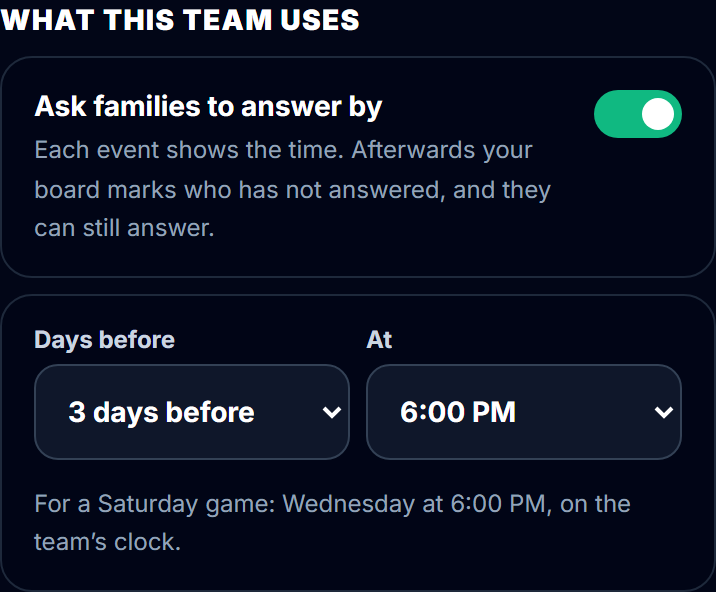
Once the team's location is set in Settings, so the time is on the team's clock, each game and practice shows a line such as "Answer by Wed, Nov 11, 6:00 PM" under Available?. Once the time has passed, the manager's availability board marks every player with no answer No answer by the deadline, so the follow-up list is already made.
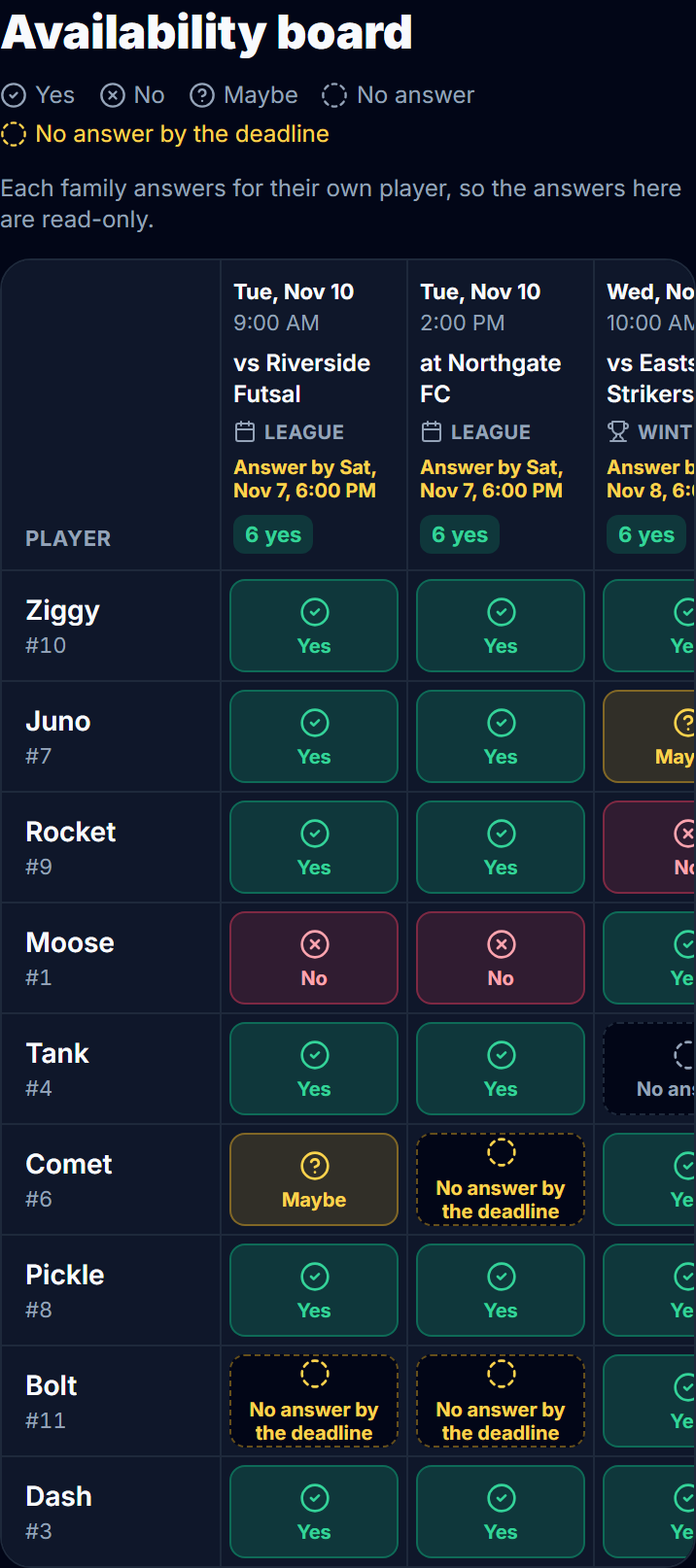
The deadline never acts on its own. Families can still answer after it, and the answer counts the same. Nobody is taken off a roster, and no answer is filled in for anybody. Picking who plays is a separate step: see availability vs match-day roster.
One payment covers the whole team. See how PlayHub works.
The rest of a manager's week is in the team manager's weekly routine, and when the game is on and some families can't be there, see how to let grandparents and family follow a game live.
FAQ
How do I track RSVPs for a youth soccer team?
Ask once per game or practice, in one place, with three answers: yes, no or maybe. Set a deadline, such as Thursday evening for a Saturday game. On the deadline night, follow up only with the families who said maybe or haven't answered, then send the coach the count.
How many players do you need to start a soccer game?
Under Law 3.1 of the IFAB Laws of the Game (theifab.com, read October 2026), a match "may not start or continue if either team has fewer than seven players," and each team has a maximum of eleven. Those are the numbers for 11-a-side. Youth leagues that play smaller formats set their own numbers, so check your league's rules.
When should a team manager ask for availability?
As soon as the week's schedule is confirmed, usually Sunday or Monday for a weekend game, with a deadline a day or two before. For tournaments, ask as soon as the dates are known, then confirm the week before.
Should I count a maybe as a yes?
No. Plan the lineup on yes only, and ask each maybe to confirm by the deadline. Keep no answer separate from maybe: no answer usually means the family hasn't seen the question.
Is an RSVP the same as practice attendance?
No. An RSVP is a plan made before the practice. Attendance is a record of who actually came. If your club needs attendance, take it at the field.
Sources
| Document | Edition / year | Link | Used for |
|---|---|---|---|
| The IFAB, Laws of the Game, Law 3 (The Players) | Web edition at /laws/latest (the page does not label its season), accessed 2026-10-29 | https://www.theifab.com/laws/latest/the-players/ | Law 3.1, eleven players maximum and seven minimum to start or continue |
| Help center, Find out who can make a game or practice | accessed 2026-10-31 | https://www.playhub-os.com/help/team-availability | Who can answer, who sees the count, no reminders |