Last reviewed
Availability vs match-day roster: who can play and who is playing
Availability and the match-day roster answer two different questions. Availability is the family's answer to "can your child make Saturday?": Yes, No or Maybe. The match-day roster is the coach's or team manager's answer to "who is playing Saturday?", picked from the players who can make it and then published. A Yes does not put a child on the roster, and a No does not take one off: the family answers, and the adult running the team decides.
A team where everybody who can come plays never needs the second question. You need it when more players can come than the game takes: a big squad with a game-day limit, a tournament roster, or one squad split across two teams.
Two questions, two owners
| Availability | Match-day roster | |
|---|---|---|
| Asks | Can this player make it? | Is this player playing? |
| Answers | Yes, No, Maybe, or no answer yet | Rostered, or not rostered |
| Who decides | The player's parent or guardian | The coach or team manager |
| When | Before the deadline you set | After the answers are in |
| Families see it | As soon as they answer | When you publish it |
Keeping them apart settles two questions before they turn into arguments. "We said yes, why isn't she playing?" has an answer: yes meant can play. And "I never said he could come" doesn't come up when only the family answers.
How many go on the roster?
Under Law 3.2 of the IFAB Laws of the Game (web edition read November 2026), competition rules must state "how many substitutes may be named, from three to a maximum of fifteen", and Law 3.3 says "The names of the substitutes must be given to the referee before the start of the match." Youth leagues and tournaments set their own numbers, and some print them on a game-day roster form. Check yours. Futsal is different: five play at once under FIFA's Futsal Laws, and the competition sets how many substitutes may be named.
A worked example: 16 can come, 12 can play
A team of 18 plays in a tournament whose rules allow 12 on the game-day roster. By the Wednesday deadline:
| Answer | Players | Count |
|---|---|---|
| Yes | #1, #2, #4, #5, #6, #7, #8, #9, #10, #11, #12, #14, #15, #16, #17, #19 | 16 |
| No | #3 (out of town) | 1 |
| Maybe | none | 0 |
| No answer | #18 | 1 |
What the manager does:
- Asks the one family that hasn't answered. #18's parent answers No on Thursday morning.
- Picks 12 of the 16 with the coach, on whatever basis the team uses: positions, a rotation, who sat out last time.
- Publishes once, on Thursday night. Every family sees whether their child is on the roster at the same time.
- Tells the four not picked directly, before or with the publish. A list on a screen is no way to find out you are sitting out.
The roster can change after it is published, say for an injury on Friday. Tell that family yourself.
A sheet you can copy
| # | Player | Can play? (Y / N / M / blank) | On the roster? | Note |
|---|---|---|---|---|
| 1 | ||||
| 2 | / limit |
Fill the third column from the families' answers and the fourth only after the deadline. The blanks in the third column are the families to ask.
Doing it in PlayHub
In PlayHub every game asks families "Available?", with Yes, No or Maybe, and only the player's own parent or guardian answers (on an adult team, the player does). Picking a match-day roster is a setting a team turns on; it is off until you do. The screenshots below are from a player pool split across two teams, which is why a family's line reads "Playing for Demo Gold"; on a single team it reads "Rostered". How the answers work is in tracking availability for a youth soccer team.
1. Turn on the match-day roster
Open the team's Settings. Under What this team uses, switch on Pick a match-day roster. You can also set a Match-day roster limit; going over it shows a warning and still saves. The switch is there for the team's owner and anybody with Manage team, once the team is active.
Families keep answering Yes, No or Maybe exactly as before.
2. Pick the roster
Each game's card now says Roster not picked yet, to the people running the team and nobody else. Tap Pick the roster. Every player is listed with their family's answer and a switch.
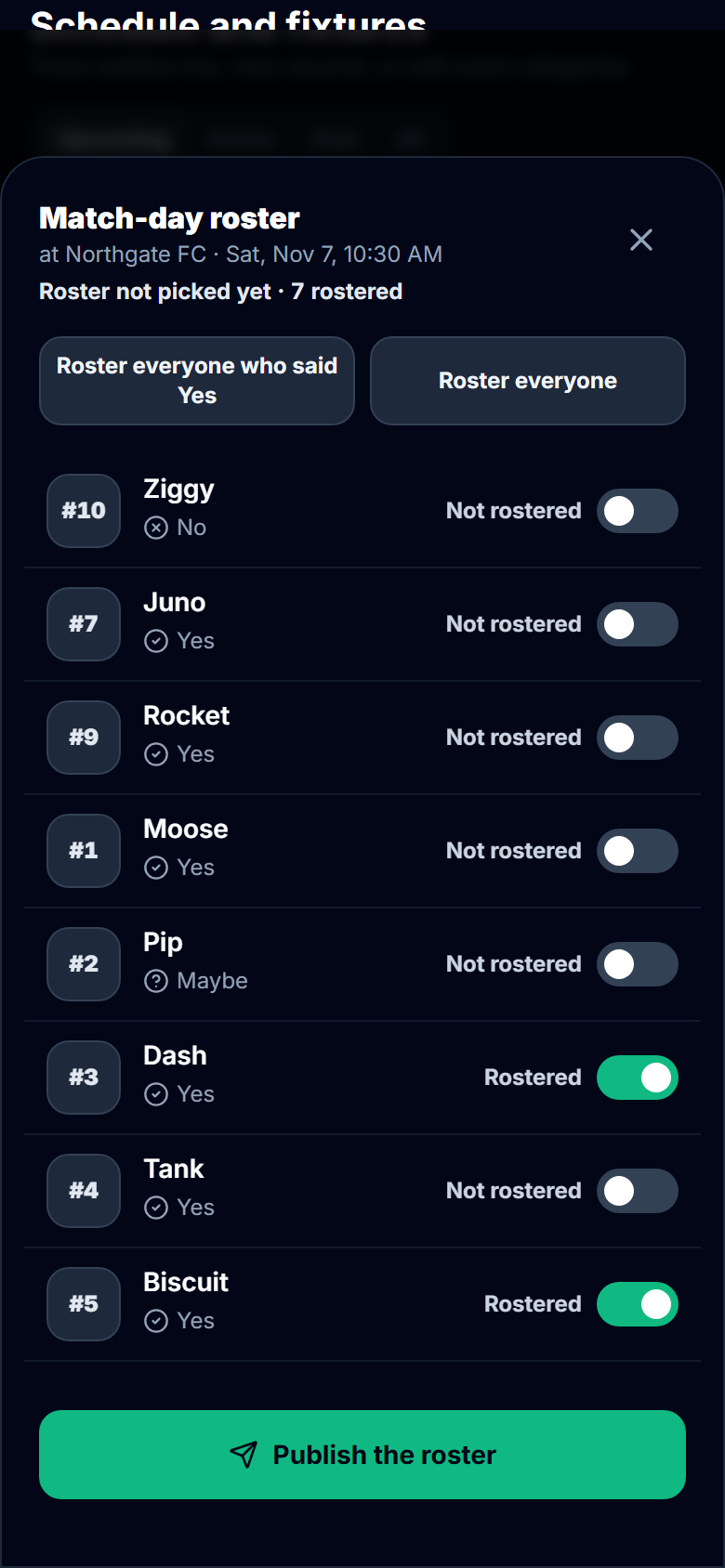
Roster everyone who said Yes and Roster everyone are single taps; then switch players on or off one at a time. You can roster a player whose family said No or has not answered, and their answer stays as it was.
3. Publish it
Tap Publish the roster. It asks once:
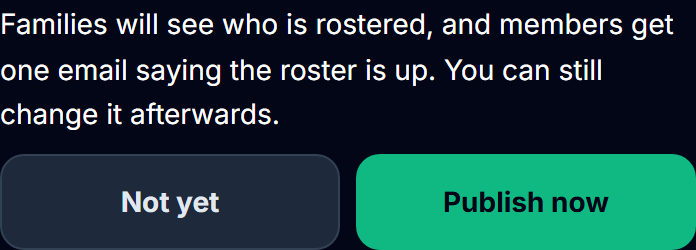
There is no unpublish. Changes after it show to families at once, with no new email. The email names the team and the game and no child, and each family member can switch it off under Who's playing in the team's Settings.
4. What families see
Before you publish, a family sees the game and their own Yes, No or Maybe, and nothing about the roster. After it, the line beside their own child says whether they are playing.
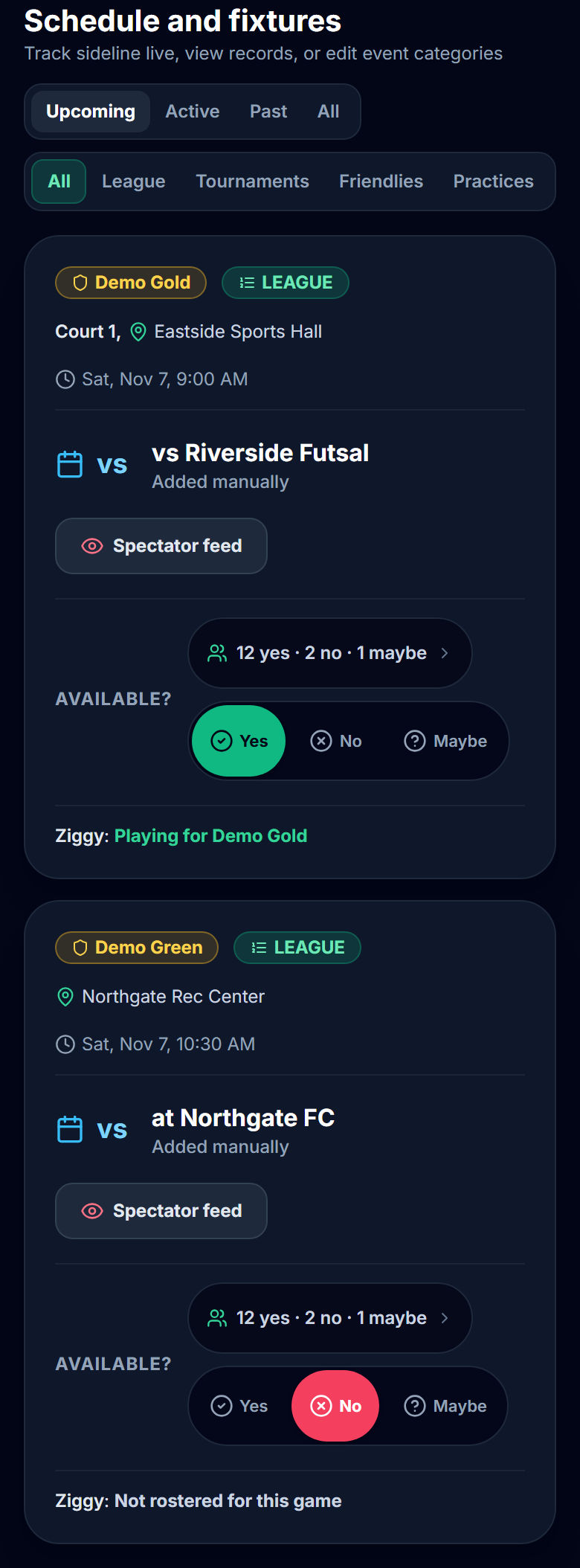
Family members invited only to watch, such as grandparents, see the rostered players on the game's live page and not the answers. For the scorekeeper, the rostered players come first in the tracker's player list, and anyone else on the team is still there under "Not rostered", so a late change never blocks a goal.
What never happens on its own
Nothing moves a player on or off the roster except the person picking it. A No after you publish does not take a child off, and a missing answer does not keep one off. If a family says their child can no longer come, change the roster yourself, and talk to the family.
One payment covers the whole team. See how PlayHub works.
FAQ
Does an RSVP Yes mean my child is playing?
No. A Yes says your child can make the game. Who plays is the coach's or team manager's decision, made after the answers are in. On teams that publish a match-day roster, you see whether your child is on it when it is published.
What is a match-day roster in youth soccer?
It is the list of players named for one game, picked from the squad. Under the IFAB Laws of the Game, competition rules state how many substitutes may be named (Law 3.2), and the names go to the referee before kickoff (Law 3.3). Youth leagues and tournaments set their own limits.
Should a team manager pick players who haven't answered?
They can, but ask the family first. The answer is the family's to give; the roster is the manager's decision, and a player who has not answered may simply have missed the question.
Who should see the roster before it is published?
Only the people picking it. Publishing once, after the deadline, means every family finds out at the same time and nobody sees a draft that changes.
What do I tell the players who are not picked?
Tell their families directly, before or with the publish. A published list tells them the fact, not the reason.
Sources
| Document | Edition / year | Link | Used for |
|---|---|---|---|
| The IFAB, Laws of the Game, Law 3 (The Players) | Web edition at /laws/latest (the page does not label its season), read 2026-11-03 | https://www.theifab.com/laws/latest/the-players/ | Law 3.2, substitutes named "from three to a maximum of fifteen"; Law 3.3, names given to the referee before the start |
| FIFA, Futsal Laws of the Game 2025-26 | 2025-26; read 2026-11-03 | https://digitalhub.fifa.com/m/20d52e6779b53321/original/FUTSAL-Laws-of-the-Game-2025-2026.pdf | Law 3.1 (five players), Law 3.2 (competition rules state how many substitutes may be named) |
| PlayHub help, Find out who can make a game or practice | read 2026-11-03 | https://www.playhub-os.com/help/team-availability | Who answers |
| PlayHub help, Player pools (section "Pick who plays each week") | read 2026-11-03 | https://www.playhub-os.com/help/team-pools | The setting and publishing |