Last reviewed
Club pass players and the weekly roster: one squad, two or three teams
A club pass player is a player registered to one of a club's teams who plays for a different team in the same club. The Wisconsin Youth Soccer Association's policy defines a club pass as "use of a registered player from one team's roster for competition with a different team in the same club." Whether it is allowed, for which games and how far up or down, is set by your state association and league, and the three documents compared below set different limits.
If you run one squad as an A and a B team, or as three teams, you make these calls every week. This guide compares three club pass documents posted by state associations, works through one week of rosters from the families' answers to Saturday's sideline, and then shows the same routine in PlayHub.
What three club pass documents say
All three are youth soccer documents posted by a state association, read on November 14, 2026. The first two are state rules. The third is posted by Missouri but carries the US Youth Soccer National Championship Series heading and explains that series' policy, so it covers only the series' Regional and National Championships. Your own state association and league may say something else. PlayHub is not affiliated with any of these associations or with US Youth Soccer.
| Wisconsin Youth Soccer Association | USYS Utah (Utah Youth Soccer Association) | USYS National Championship Series (posted by Missouri Youth Soccer Association) | |
|---|---|---|---|
| Document | Club Pass Policy, approved by the WYSA Board of Directors 04/08/13 | How to Club Pass a Player for league games (no date printed; the file is named 2020ClubPass) | Club Pass vs Transfer Players (no date printed) |
| Applies to | Club passes in general, and WYSA-sanctioned tournaments that accept them | League games | The Regional and National Championships of the National Championship Series |
| Which teams | "players are eligible to be club passed to any team in their club provided they are age appropriate" | "You cannot club pass to another team that plays in the same bracket as your team." and "Players cannot club pass down more than 2 divisions." | "A club pass player may be rostered at the Regional and National levels, provided that the player is not rostered to another team within that Club that is still competing in the National Championship Series." |
| How many | "There is no limit to the number of club pass players per competition" (the team's maximum still applies) | A team with a full roster cannot take one: "Teams MAY NOT deactivate a player to open up a spot for a club pass player, unless the team is U15-U19." | Not stated in this document |
| Whose player first | "A player's first obligation shall be to the team they were rostered to for the seasonal year." | "Players who are multi-rostered may not club pass from their primary or secondary team." | "A player may only play for one club in the National Championship Series." |
What the table shows:
- "Same club" is the whole idea. Wisconsin calls the club pass "an intraclub player arrangement" that "is not intended to be used as an interclub arrangement between two different clubs." A player borrowed from another club is usually a guest player, under separate rules.
- Limits differ from one document to the next. Wisconsin's policy sets no count per competition. Utah's limits which brackets and divisions a player may move to. The National Championship Series document limits who can be added for the regional and national stages.
- Paperwork exists. Wisconsin's policy says teams using club passes "must designate on the official game report (or game day roster) the names and player registration numbers." Utah's document has the lending team assign the player to the borrowing team, game by game, in the association's system.
These are soccer documents. If your squad plays futsal, ask your futsal league how it handles a player appearing for two of your teams.
A worked week: 16 players, three games, two teams
The squad has 16 players and plays as Demo Gold and Demo Green. This week Gold plays Saturday at 9:00 and Sunday at 1:00, and Green plays Saturday at 10:30 at a different field. The example's league allows eight per game and lets a player appear for both teams in a week. Families answered by Wednesday. On Thursday the manager lays the week out as one grid: every game a column, grouped by team, every player a row.
| # | Player | Gold, Sat 9:00 | Gold, Sun 1:00 | Green, Sat 10:30 | This week |
|---|---|---|---|---|---|
| 1 | Ziggy | Yes, picked | Yes, picked | No | 1 team · 2 games |
| 2 | Juno | Yes, picked | No | Yes, picked | 2 teams · 2 games |
| 3 | Rocket | Yes, picked | Yes, picked | Yes | 1 team · 2 games |
| 4 | Moose | Yes, picked | Yes, picked | Maybe | 1 team · 2 games |
| 5 | Pip | Yes, picked | Maybe | Yes | 1 team · 1 game |
| 6 | Tank | Yes, picked | Yes, picked | No | 1 team · 2 games |
| 7 | Pickle | Yes, picked | Yes, picked | No answer | 1 team · 2 games |
| 8 | Sunny | Yes, picked | No | No | 1 team · 1 game |
| 9 | Waffles | No | Yes, picked | Yes, picked | 2 teams · 2 games |
| 10 | Biscuit | No | Yes, picked | Yes, picked | 2 teams · 2 games |
| 11 | Comet | Maybe | Yes, picked | Yes, picked | 2 teams · 2 games |
| 12 | Bolt | No answer | No answer | Yes, picked | 1 team · 1 game |
| 13 | Taco | No | No | Yes, picked | 1 team · 1 game |
| 14 | Nugget | No | No | Yes, picked | 1 team · 1 game |
| 15 | Dash | Yes | No | Yes, picked | 1 team · 1 game |
| 16 | Echo | No | No | Yes | None this week |
| 17 | Picked | 8 | 8 | 8 |
What the grid shows:
- Juno is the row to check. "2 teams · 2 games" on its own is ordinary in this league, but Juno's two games are Gold at 9:00 and Green at 10:30 the same morning, at two fields. Can the family get there in time? And under your league's rules, can Juno play for both?
- Waffles, Biscuit and Comet play for both teams on different days. That is the club pass question in the table above. Under Utah's document, for example, it depends on whether the two teams play in the same bracket.
- Echo said Yes and is not playing. "None this week" beside a Yes is the family to call before you publish, not after.
- Rocket said Yes to all three and plays two. The answers say who can play. How many games one player gets is your decision, and the grid puts the numbers in front of you.
A sheet you can copy
| # | Player | Team ___, game 1 | Team ___, game 2 | Team ___, game 3 | This week (teams · games) |
|---|---|---|---|---|---|
| 1 | Picked |
Fill each game with Y, N or M from the families' answers and circle the ones you pick. Fill the last column before you publish: a player on two teams, or a Yes with no games, is the row to look at again.
Publish once per game, then game day
Publish each game's roster once, when it is decided, so every family finds out at the same time. The difference between a family's answer and your pick is in availability vs match-day roster, and how to collect the answers by a deadline is in tracking availability for a youth soccer team.
On game day the roster you published and the players who arrive can differ: a sick child, a late car, a player borrowed from the other team because Green has six. Change your roster at the game, not on Sunday night from memory, so your record of who played for which team is right. A borrowed player may also need the league's own paperwork before kickoff: Wisconsin's policy has club pass players written on the official game report, and Utah's has the lending team assign them to the game in the association's system. Your team's roster replaces neither.
Doing it in PlayHub
In PlayHub a player pool holds the squad once, and each of its teams holds its own games. Setting up the pool and its teams is in how to run a player pool. These steps are for the person running the pool, and the full reference is the help article on player pools.
1. Open the week
On the pool's schedule, tap Rosters & availability. A new pool has Pick a match-day roster on, and then the board opens in Week, on the week of the next game that has not kicked off. The arrows step a week back or forward, and Upcoming switches to the coming games instead.
Every game of the week is a column, grouped under its team, and there is a button for each team that jumps to its games. Each cell shows the family's answer: Yes, No, Maybe or No answer. Only the pool's owner, coaches and managers open the board.
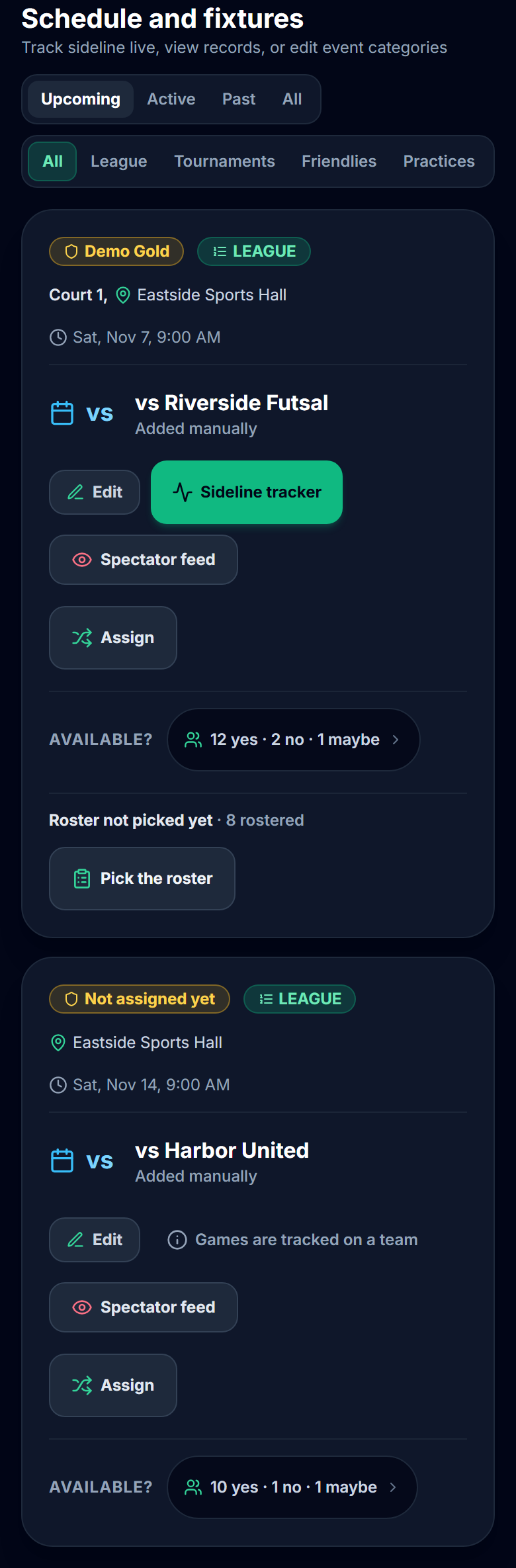
A game the pool has not given to a team yet is listed above the grid under Not assigned yet, with a link to the pool's schedule. Tap Assign on that game's card there. Nobody can be rostered for it until it has a team.
2. Tap to pick
The board's instruction is the whole method: "Tap a player to put them on that game's roster. Tap again to take them off." A picked cell shows the team's name under the answer. Beside each name the board counts that week, as the last column of the sheet above does: "1 team · 2 games", "2 teams · 2 games" or "None this week". It is a count, not a limit, so it never stops a pick. The screenshot is a two-game Saturday for the same squad, so its counts differ from the sheet above.
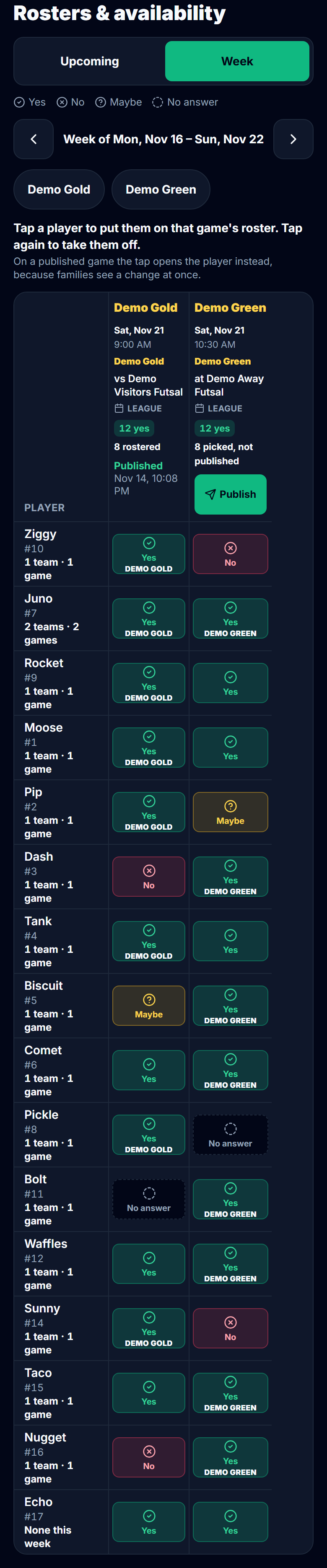
If you set a Match-day roster limit in the pool's Settings, a column over it says so, for example "9 rostered, limit 8", and still publishes. Without a signal the board changes nothing and says "You're offline. Rosters can't be changed until you reconnect."
3. Publish each game
Each column has its own Publish. It asks once:
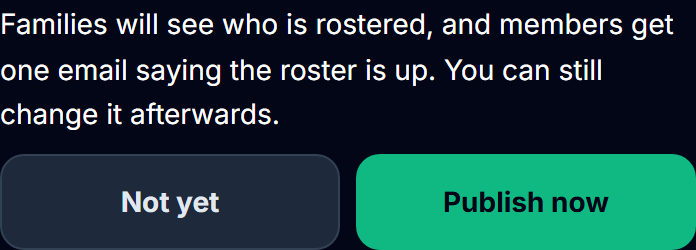
Members who have the Who's playing email on get one email per game, such as "The roster for vs Riverside Futsal is up". It names the team and the game and no child. Later changes show to families at once with no new email, so on a published game a tap opens that player's card instead of flipping the pick. There is no unpublish.
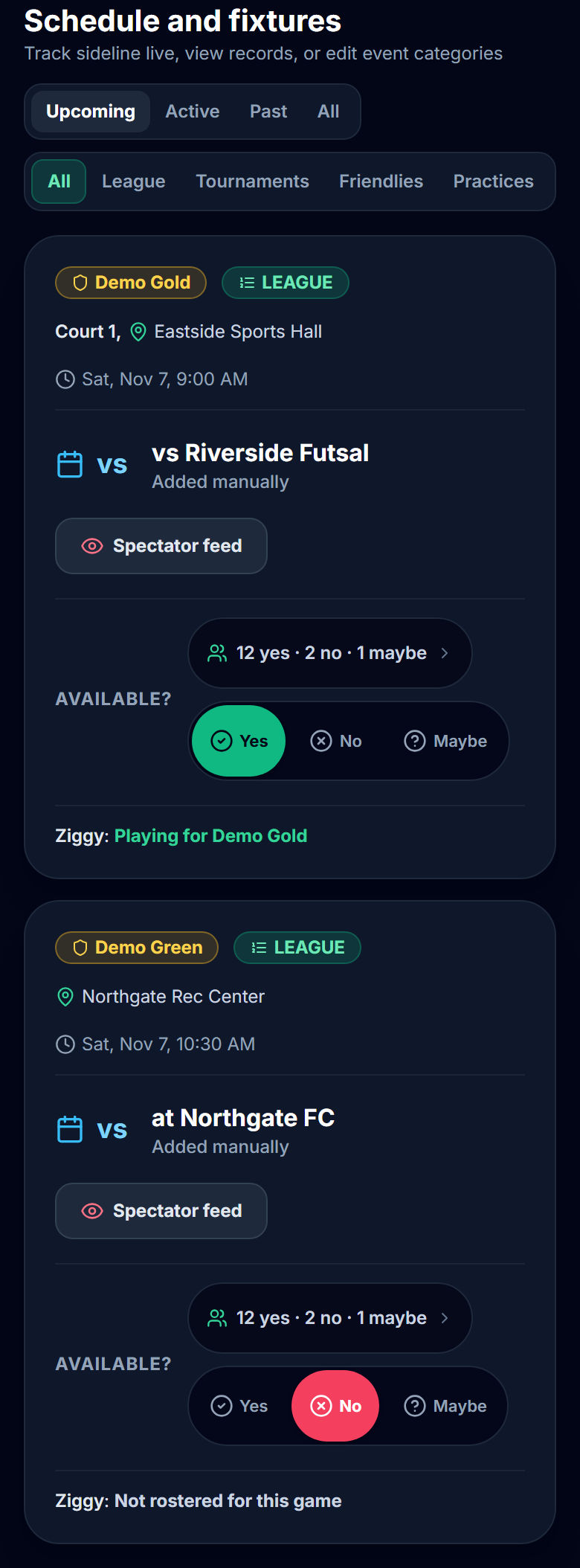
Families then see their own child's line on each game:
4. Change it at the game
From kickoff to full time, whoever runs that game's tracker sees Today's roster under the period controls. It lists every pool player with their family's answer and a switch. A tap changes the roster at once, Undo puts the last tap back, and without a signal the change is kept on the phone and sent when it reconnects. If nobody published the roster before kickoff, the first change publishes it, and the roster email goes out once.
If the published roster is missing someone who just scored, crediting the goal to them asks "Add #7 to today's roster?" with Add #7 and Not now. The goal is recorded either way. Afterwards the game's card and its column in Week show the manager what changed, for example "Changed at the game: #12 added, #4 removed". How the rest of the tracker works is in how to keep score at a futsal game.
5. Games played, counted for you
While the pool picks rosters, the season leaderboards show each player's games played beside their figure, such as "3 · in 5 games". A game counts for a player who was on its published roster or who is named in anything recorded in it, and in a pool it counts for the team whose game it was. A roster that was never published counts for nobody. PlayHub shows no minutes and no ranking by games played.
One payment covers the whole team. See how PlayHub works.
FAQ
What is a club pass player in youth soccer?
A club pass player is a player registered to one of a club's teams who plays for a different team in the same club. The Wisconsin Youth Soccer Association's 2013 policy defines a club pass as "use of a registered player from one team's roster for competition with a different team in the same club." The limits are set by each state association and league.
Is a club pass player the same as a guest player?
No, in the documents compared here. Wisconsin's policy calls the club pass an arrangement inside one club, "not intended to be used as an interclub arrangement between two different clubs", and says that in a tournament that allows club passes "those players shall not count as guest players for the event." A guest player usually comes from another club, under the tournament's guest rules.
Can my child play for two of the club's teams in the same week?
It depends on your state association and league. Of the three documents compared here, Wisconsin's allows a club pass to "any team in their club provided they are age appropriate", Utah's does not allow one to a team in the same bracket or more than two divisions down, and the National Championship Series document Missouri posts limits who can be added for regionals and nationals. Ask your team manager or check your state association's rules.
How do I pick rosters for two teams from one squad each week?
Put every game of the week side by side, one column per game, with each family's answer in it. Place the players who can make only one game first, then check each player's count of teams and games before publishing. A player on two teams, or a Yes who plays no game that week, is the row to look at again.
What if different players turn up on game day?
Change that game's roster at the game, while you still know who came, so your record of who played for which team is right. A player borrowed from another of your club's teams may also need to be on the official game report, or entered in your state association's system, before kickoff. Check your league's process.
Sources
| Document | Edition / year | Link | Used for |
|---|---|---|---|
| Wisconsin Youth Soccer Association, Club Pass Policy | Approved by the WYSA Board of Directors 04/08/13, effective August 1, 2013; read 2026-11-14 | https://www.wiyouthsoccer.com/wp-content/uploads/sites/168/2023/06/club_pass_policy_0413_-_new_logo.pdf | Definition; intraclub, not interclub; any age-appropriate team; no limit per competition; first obligation; game report; not guest players |
| USYS Utah (Utah Youth Soccer Association), How to Club Pass a Player for league games | No date printed (file named 2020ClubPass); read 2026-11-14 | https://www.utahyouthsoccer.net/wp-content/uploads/sites/234/2023/11/2020ClubPass.pdf | Same bracket; two divisions; full rosters; multi-rostered players; lending team processes it |
| US Youth Soccer National Championship Series, Club Pass vs Transfer Players, posted by the Missouri Youth Soccer Association | No date printed; read 2026-11-14 | https://www.missourisoccer.org/wp-content/uploads/sites/164/2023/06/Transfer_vs_Club_Pass.pdf | Regional and National Championships; one club in the series |
| PlayHub help, Player pools: what they are and when to use one | read 2026-11-14 | https://www.playhub-os.com/help/team-pools | The steps in PlayHub |